

ASCOM IP SafetyMonitor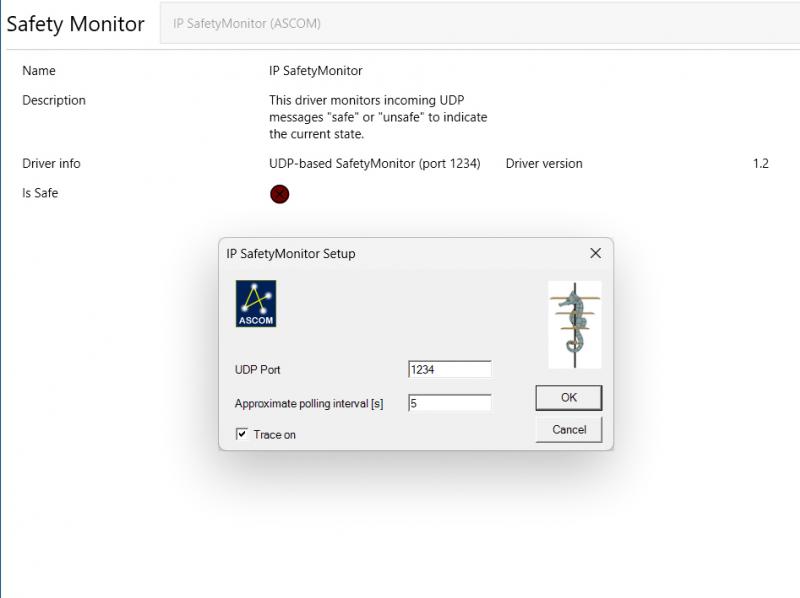 Figure 1: The settings dialog window of the ASCOM IP SafetyMonitor. Recently I added an ESP32-ETH02 based cloud sensor to the observatory. One of the members of our astrophotography workgroup made the first development with the intention to stop and restart a NINA sequence with it. The problem was setting ASCOM IsSafe from an external device like the cloud sensor over the ethernet. He managed to do so by using the ASCOM File SafetyMonitor and creating a file from the ESP32 using a PowerShell, but that meant he had a long chain with an equal amount of possible failures: Sensor → ESP32 → WiFi → PowerShell Bridge → Text file → ASCOM File SafetyMonitor → N.I.N.A. By using the IP SafetyMonitor this chain is shortened by two steps: Sensor → ESP32 → WiFi → IP SafetyMonitor → N.I.N.A. The IP SafetyMonitor is written in C# .NET using Visual Studio and has passed the ASCOM Conform test (report is included in the zip file). Version 1.2.2 can be downloaded from my server: http://www.dehilster.info/docs/IPSafetyMonitorSetup.zip.1 Using the driver is straightforward. In the settings dialogue, specify the UDP port to which the Ethernet-capable device (Arduino, ESP32, etc.) sends its data. The second field defines the approximate polling interval at which the device transmits its messages. The driver maintains a running average based on this interval, during which the actual polling interval is measured. If the device remains silent for three times the average polling interval, IsSafe is set to unsafe until a new "safe" message is received. Likewise, when the IP SafetyMonitor is first connected, it will remain unsafe until the initial "safe" message arrives. Conform ASCOM rules the driver starts in unsafe mode until the sending device sends its first "safe" message. It is thus of importance that the sending device regularly sends the "safe" message and not only the "unsafe" messages. For testing purposes an Arduino IDE sketch is available and the following PowerShell script can be used for quick command line testing (run the PowerShell as Administrator and copy paste below code as a single block): $udp = New-Object System.Net.Sockets.UdpClient $bytes = [Text.Encoding]::ASCII.GetBytes("safe") $udp.Send($bytes, $bytes.Length, "[IP address]", [UDP port]) $udp.Close() The [IP address] and [UDP port] need to be replaced with the IP-address (as set in the pc's network settings) and UDP port (as set in the driver) of the pc running the IP SafetyMonitor. Change logv.1.2.2 (20260614): Improved robustness. v.1.2 (20260606): Debugged settings dialogue form (approximate polling interval was not stored). v.1.1 (20260605): Added UDP tracker to set IsSafe unsafe when messages no longer arrive, driver now starting unsafe conform ASCOM rules. v.1.0 (20260605): First stable version. Disclaimer[1]: USE AT YOUR OWN RISK! This software is provided free of charge and may be redistributed without restriction. Its use is entirely at the user’s own risk. No guarantee is given regarding its accuracy, reliability, or suitability for any particular purpose. The author accepts no liability for any damage, loss, or malfunction arising from the installation or use of this driver. If you have any questions and/or remarks please let me know. |
InFINNity Deck... Astrophotography... Astro-Software... Astro Reach-out... Equipment... White papers...
ASCOM Envir. SafetyMonitor ASCOM File SafetyMonitor ASCOM Generic UPS driver ASCOM IP SafetyMonitor ASCOM SafetyMonitor Hub Astronomical Twilight FITSalize Log10mGrabber MountCMD MountMonitor PySpectrometer3